 WalletPlus
Tool · webshop and ordering
The customer shops with you. Not with a marketplace.
Webshop and ordering is the core of WalletPlus: your range, your domain, your customer. No middleman owns the order afterwards. The engine is the same whether you sell food, flowers or coffee on the go. What changes from industry to industry is the design and the purchase flow.
Example from the Restaurant module: the figures come from one real restaurant on WalletPlus, a pizzeria with a grill, four months after they went online. We have not put a name to it, but they are their own figures and not an average.
The Restaurant module · from hunger to receipt
Six steps. Under two minutes.
This is what the purchase flow looks like in the Restaurant module. The Florist module runs on the same engine, but with its own flow: bouquet, size, card message, delivery day and recipient, payment. See the Florist module →
For en blomsterbutik kan du læse om kravene til en blomsterwebshop; for kiosk og food-to-go har vi en guide til online bestilling på tankstationen.
01
Pickup or delivery
The guest first chooses how the food should get there. Opening hours, closing days and delivery zones by postcode determine what can be chosen at all.
02
The menu
Categories, images, prices. Sold-out items are marked, and a category with a time window, such as lunch or weekend, only appears within its window.
03
The item is customised
Size, required choices such as protein and a drink, add-ons with and without a surcharge, and removal of what the guest does not want. The price follows every choice.
04
Complete the order
After each item the system suggests what usually goes with it. That is where the basket grows, not by raising prices.
05
Payments
Card 53%, Apple Pay 39%, Google Pay 5%. Cash on collection is 4% and can be switched off if you do not want it.
06
The kitchen
Receipt on the printer and the order on the kitchen screen in the same second. The guest gets their receipt, and you have the order in the dashboard afterwards.
The Restaurant module · two ordering flows
Same menu. Two ways of asking.
In the Restaurant module, ordering comes in two versions. The basket, the checkout, the payment, the kitchen and the dashboard are identical; the only difference is how the guest makes their way through the menu. That is a bigger difference than it sounds.
Version 1
The classic menu page
The whole menu on one page. The guest scrolls, taps an item and gets a single sheet with every choice gathered: protein, drink, add-ons, quantity. One tap and the item is in the basket.
It is built for the person who knows what they want. They know number 34, they scroll past the rest, and they are done in under a minute.
- A category menu that follows as you scroll
- A product sheet with every group at once
- Offers and campaign prices at the top of the menu
- A basket that floats down the page with you
Status: this is the version every one of our restaurants runs today. Every single order in the figures above came through it.
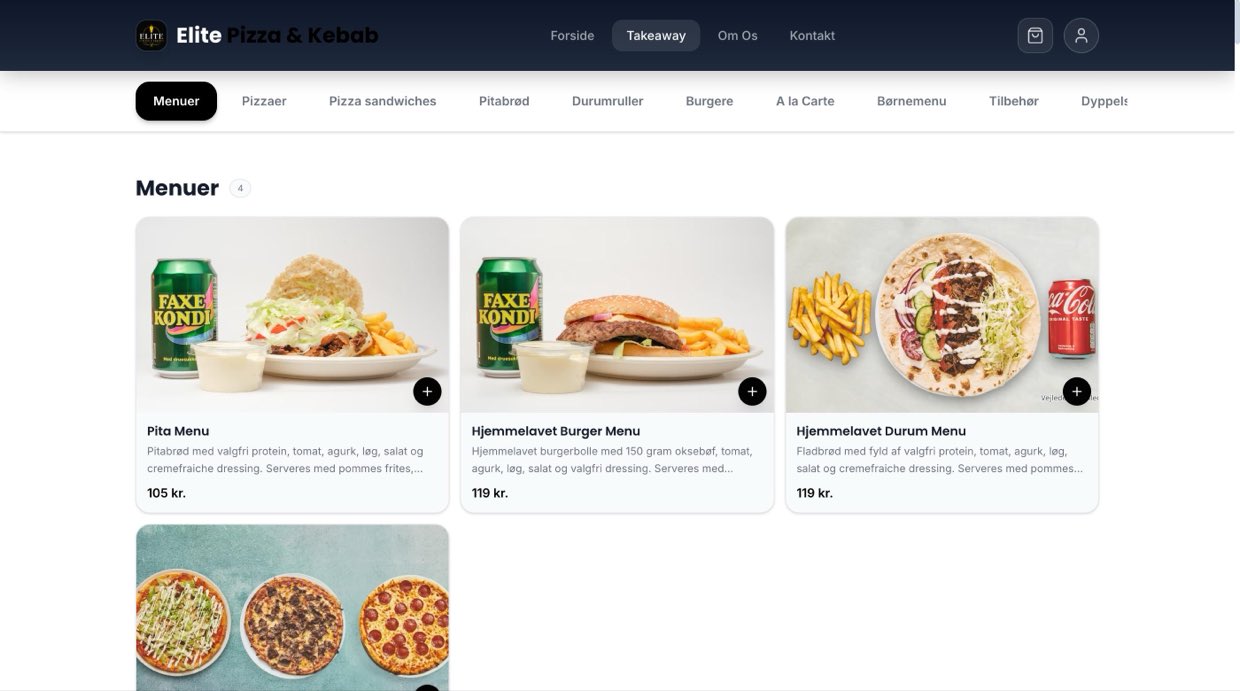
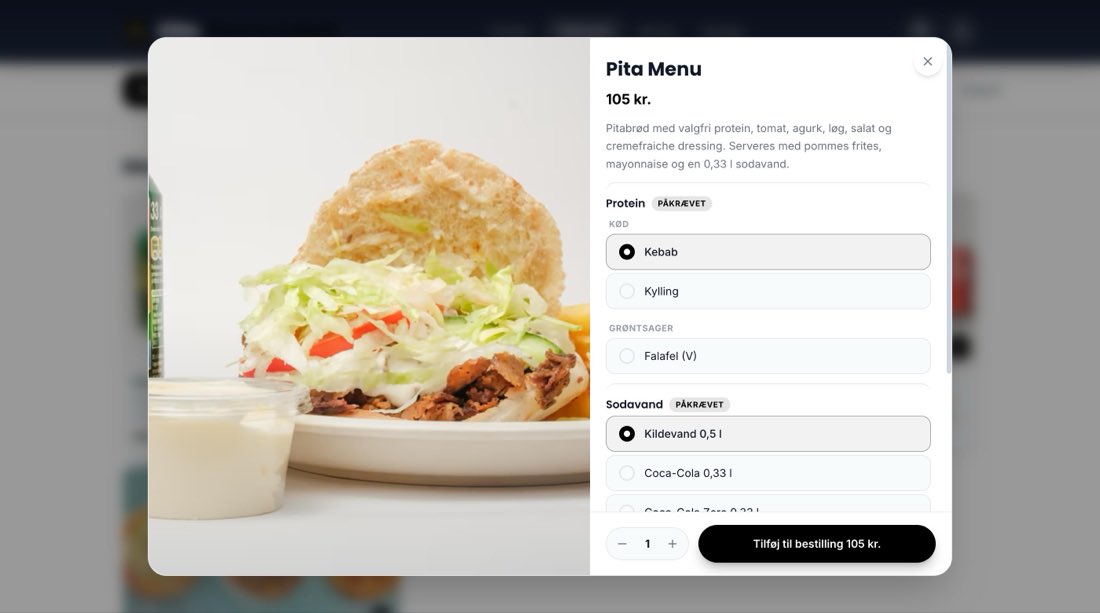
Screenshots from elitepizzaogkebab.dk, September 2026
Version 2 · premium
The guided flow
The same menu, but instead of one long sheet the system asks one question at a time, like an ordering kiosk at McDonald's. Choose a size. Choose a side. Choose a drink. Anything else?
Nobody writes the flow by hand. The rule is one sentence: a choice group that must be answered becomes a question, and everything else becomes customisation. Marqus' rolled kebab menu gives two questions. A café with no required choices gives none, and that is the right answer, not a shortcoming.
- One category at a time instead of one long scroll
- One question at a time, with images and a price per choice
- “Customise”: remove or double up on ingredients
- Upsells suggested after each item, not just in the basket
- Same checkout: choose pickup, eat in or delivery, and a time
Status: ready. Say the word and we switch it on for your site. You will be among the first to run it, and we follow the numbers closely together with you.
Price: Included in your agreement for now. We would rather get it out there and see what it does to the basket.
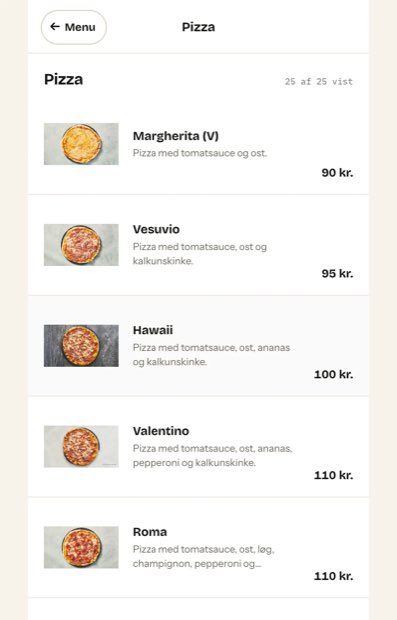
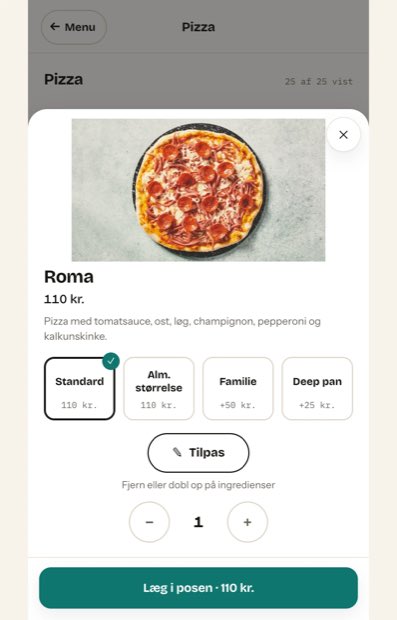
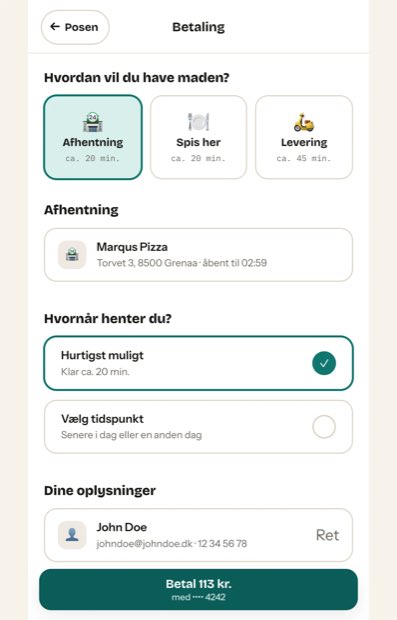
Screenshots from the ordering flow, Marqus Pizza Grenaa
Navigation
ClassicThe whole menu in one scroll
PremiumOne category at a time
Choices on the item
ClassicEvery group on one sheet
PremiumOne question at a time
Best for
ClassicRegulars and short menus
PremiumNew guests and large menus
Upselling
ClassicSuggestions after each item
PremiumSuggestions after each item + required choices shown with a price
Basket, checkout, payment
ClassicIdentical
PremiumIdentical
Status
ClassicIn service at all our restaurants
PremiumReady, switched on by request
Pricing
ClassicIncluded in the rate
PremiumIncluded in the agreement for now
Under the bonnet
This comes with it, whichever module and version you use.
Items with variants
The same item in several sizes, each with its own price and its own choices.
Required and optional choices
With or without a surcharge, and the price follows every choice.
Offers and campaign prices
On the whole order, a category or a single item, with a start and end date.
Upselling
“Complete your order” suggests what usually goes with the item.
Opening hours and closing days
Ordering closes by itself, and the customer is told when you are back.
Categories with time windows
Lunch only at lunchtime, morning coffee only in the morning. No manual tidying up.
Sold out with one tap
The item greys out in the webshop instead of being ordered and then rejected.
Pickup, eat in and delivery
Your own delivery zones by postcode, or Wolt Drive for food if you do not drive yourselves.
Ordering ahead
The customer can choose a pickup time later today or on another day.
Receipt and order SMS
The customer is notified when the order is received and when it is ready.
Order screen and receipt printing
Epson, Star and ordinary ESC/POS printers over network or Bluetooth.
Five languages
Danish, English, German, Swedish and Norwegian across the whole ordering flow.
See the full list on the pricing page: 195 features, and none of them cost extra.
Your domain
The ordering belongs in your name.
Your own domain is not decoration. It is the difference between the customer googling you or a marketplace next time, and between being able to contact them afterwards or not. In the Restaurant module, 3 out of 4 of our customers run on their own domain.
We host the site, and products and campaigns can be changed quickly, centrally for a whole chain or locally in the individual store.
Know-how for your day-to-day
Read more in our guides
Online ordering for petrol stations and kiosks
Food, coffee, pickup and campaigns for regular customers.
Next step
Try it before you make up your mind.
We set up your own range so you can shop your own products and see the difference. Restaurants get the menu in both versions. It is without obligation, and you do not sign anything.
Or call: 61 10 00 83 · sales on weekdays 10–16